
Lead Ponds
Lead Ponds are a FUB feature that allows us to make leads available to lots of agents at once. You get to preview the lead to see if it's a good fit, and if you think it is, you then claim the lead.
Our requirement to 'pull' a lead is to have a 1-2 minute conversation with the lead OR set an appointment. This ensures you had meaningful communication with the lead and can start to nurture them.
Rather than "push" leads to agents (who are then obligated to work them), Lead Ponds allow us to make opportunities available to you and you choose whether or not you would like to take them. Lead Ponds truly give you the power!
It also allows us to place new leads into a pond called "Money Time Pond" and agents can signup to get access to this pond/ leads for a period of time.
Here is a visual representation of an agents Database. Click HERE for more info and watch a video explanation.
We generally recommend utilizing the 'Smart Lists' inside of the CRM. Click here for a better understanding of how lists can help you work your Database, stay organized with your leads, and how they work.
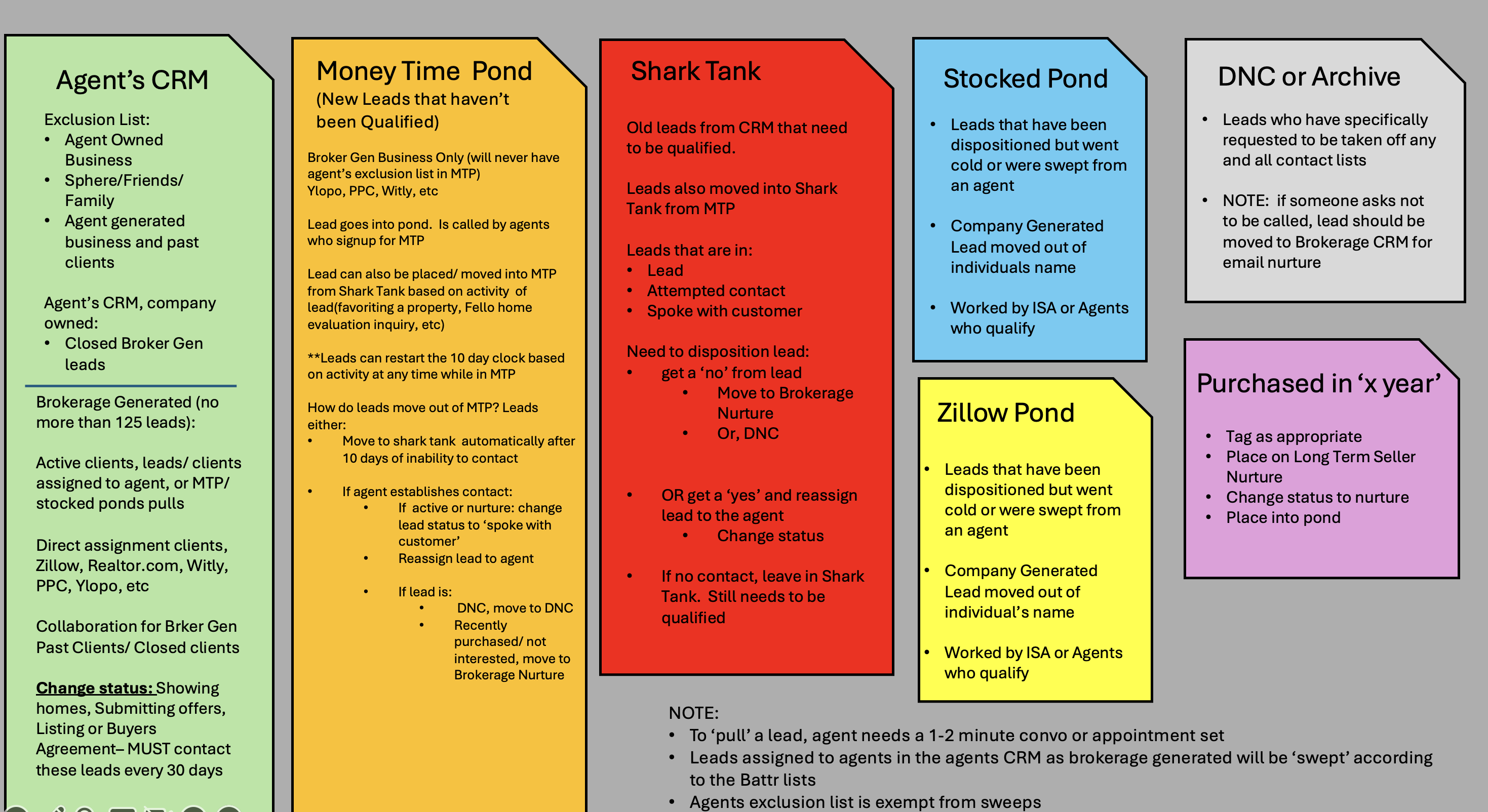
Ponds: A cluster of leads that are unclaimed / Overflow Leads & Workflow
These are leads that have not been claimed by an agent as they were received OR they have been placed back into one of the ponds. Since these leads have not been serviced quickly, there is generally a lower conversion rate, but there are absolutely opportunities here. When you claim these leads, understand that consistent follow-up is necessary. Also, understand that these are awesome opportunities to increase your production! It's a best practice to claim and work these leads from your laptop, and it usually makes sense to do so as part of your Daily FollowUp.
How to..... Fish from one of the Ponds
-
Login to FUB > Click on the Pond > Navigate to the Appropriate Pond
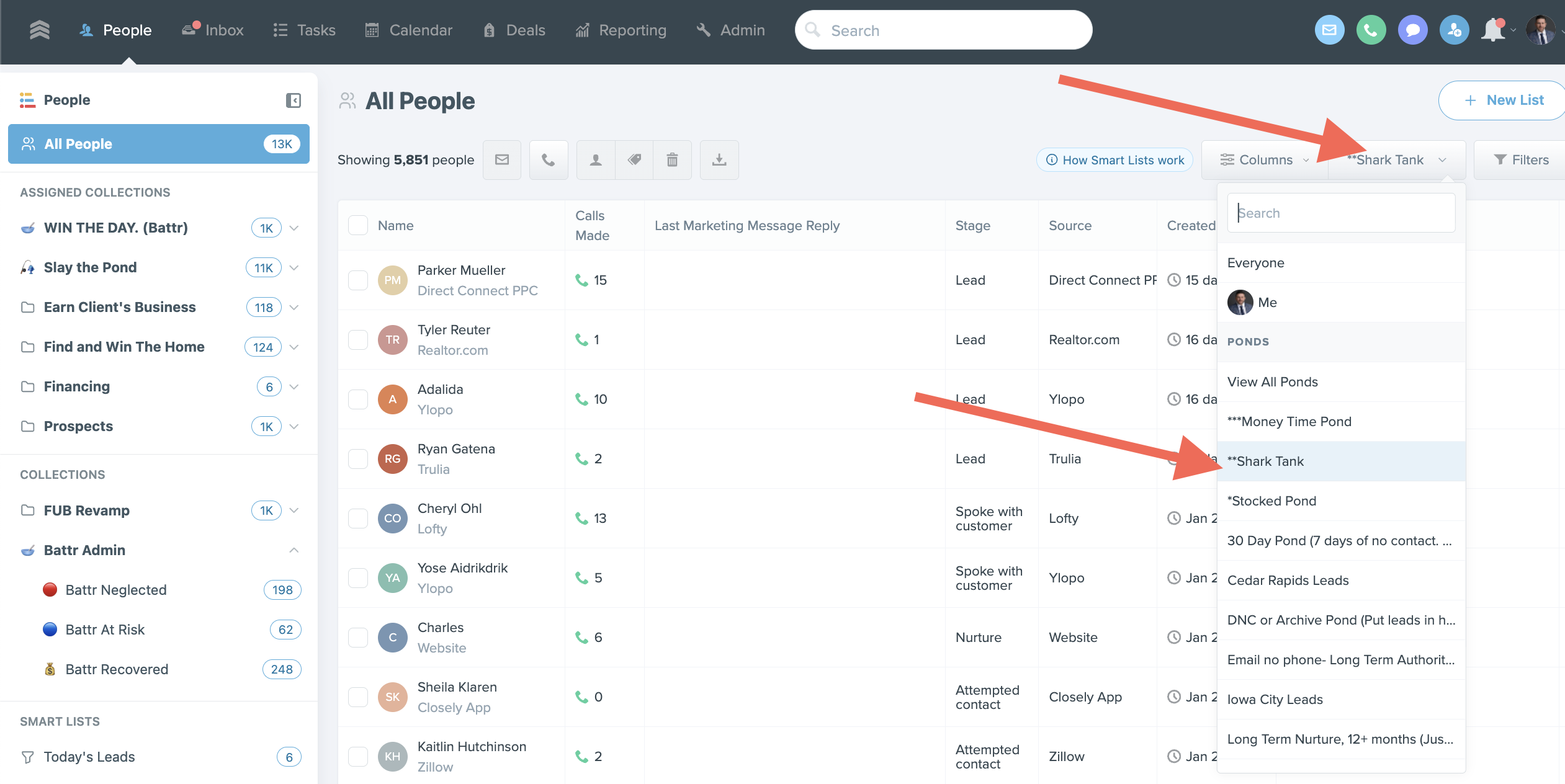
- Claiming the lead:
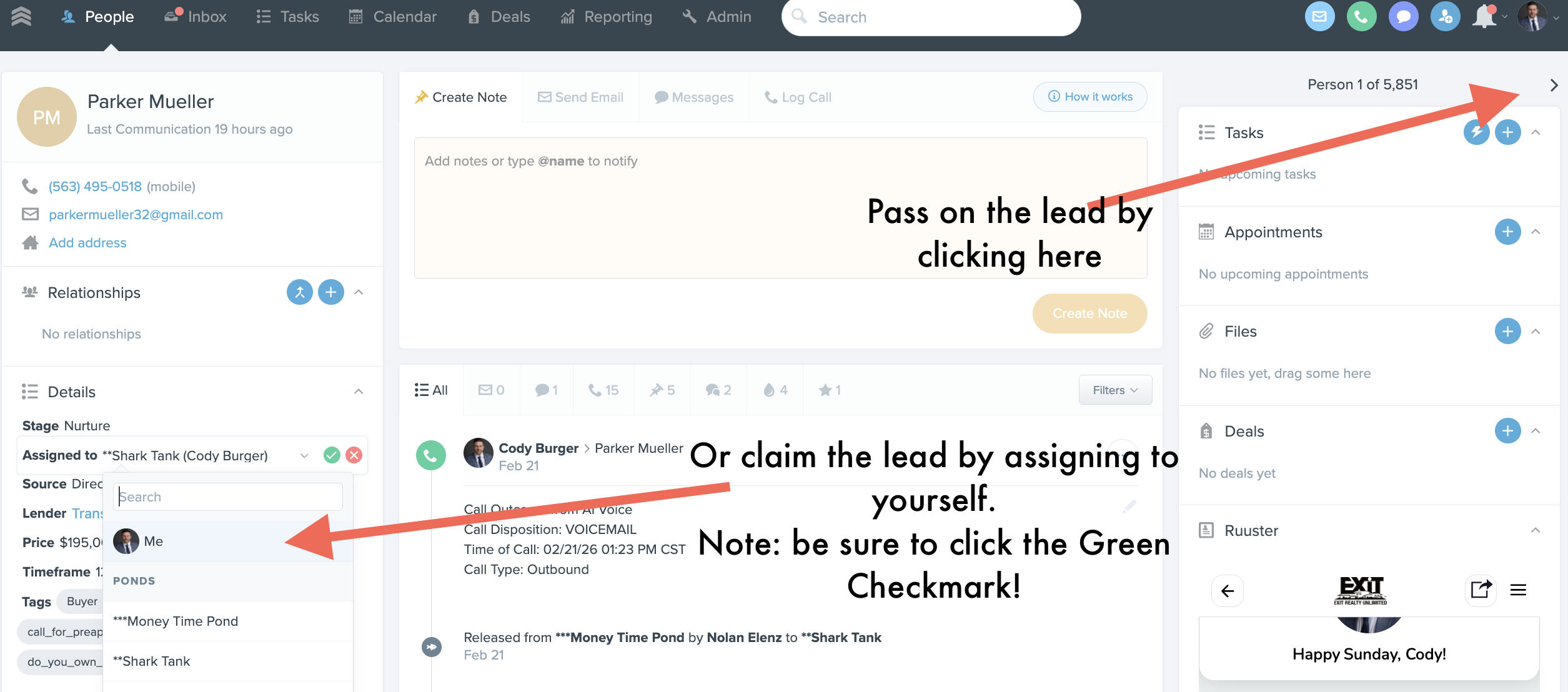
- You aren't required to call and/ or contact any specific lead. If you want, you can pass on the lead by clicking the next '>' button (top right below)
- In order to claim a lead, we require the agent to have a meaningful conversation with the lead
-
Generally speaking, you should be able to answer most of the LPMAMA questions before
-
Once claimed: Update lead, Build Search Map in Ruuster, and start nurturing the lead
Once you pull a from a pond you need to:
- Update the timeframe (Battr will send reminders for sweeps on this). This will determine the cadence for how often you should be reaching out to the lead
- Update Stage- Nurture, Appointment Set, Showing homes, etc
- Setup a home search in Ruuster
- Start providing value
- Different types of Company Generated Ponds available for Agents to work
Money Time Pond-
- Leads that are new to the database that aren't directly assigned to an agent. They registered through a paid ad OR a click funnel and showed interest in a property. OR, re-engaged with a property alert, or requested information.
- These leads should be called- if no answer, call back (double tap).
- DO NOT: leave v/m, text, or email. Why?
- Money Time pond shifts occur several times per day. This will likely be the most active pond. Therefore, we do not want consumers getting voicemails, texts, and emails for our agents which can create frustration and confusion.
- Note: It takes the average internet lead 18-22 call attempts before they respond or pick up the phone and have a meaningful conversation. Often times, they are busy, don't know who is calling, etc. Most all people will be respectful and thank you for the call. You will get an occasional upset person- be respectful and if they ask to be removed from our call lists, please do so by placing them in our DNC list.
Stocked Pond-
- These are leads that are company generated and at one point were likely in an agents name. These leads have been dispositioned (we know what they want, timeframe, etc). They were likely swept from an agent, OR an agent lost touch with them.
- As a rule of thumb, if you lose touch with a lead but have had meaningful conversations with them about LPMAMA, then put them into stocked pond as they have been dispositioned.
- Do not throw leads that haven't been dispositioned, back into the Stocked Pond- send to Shark Tank
- It is important to read through old notes in the CRM to familiarize yourself with the leads history, info they've given, etc.
Iowa City Pond
- Leads that are in the geographic area specifically of Iowa City/ Cedar Rapids/ North Liberty
Wisconsin Pond
- Leads that are in the geographic area specifically of Wisconsin
Shark Tank
- These leads, we have no idea what they want.
- They should not be in 'LEAD' status.
- Almost all leads in here should be in Attempted contact or Spoke with Customer.
- We have not qualified these leads enough to know what they want.
- Think of the Shark Tank as a mixed bag- you don't know what you're going to find. But, you never know when you land a new client, simply by following up.
- It's important to read through old notes and see if there is any important or pertinent information in there.
DNC
- Do Not Call, Text, or Email these leads. They have requested to be removed from our communication channels.
- Do not delete them though- it's important for us to save our records to show that we have ceased communication after they have requested same.
- Conversely, if they return to our site after a period of time, have a new inquiry, etc, the DNC status is no longer effective and they have given us a new set of permissions to reach out and/ or contact them.
Email - no phone
- These were likely internet leads that came in for which we only have an email. These leads are very Top-of-Funnel. We will continue to email market to them as an agency and build credibility with them over time.
Exclusion List-
- This is a list of people that you bring into the CRM, and/ or develop over time while you build your business with us.
- The exclusion list is anyone added into the CRM labeled as SPHERE.
- When leaving the company (which we hope never happens, but inevitably does for some), you will be able to take your exclusion list.
- This list is deleted from the Company's CRM. We are happy to do it with you so you can witness- we operate in abundance. There is plenty of business and opportunity out there- we don't need to hog and steal your personal client data.
- We will use the following filters in FUB to export an agents exclusion list and delete from our database.
- A filter of: Agent name, include: SPHERE.
- Export leads
- Delete leads from database
- Upon seperation from the brokerage, the agent will also be able to export their company generated business clients that they have had a past closing with. These leads will also be retained in the database for the company to also market to the lead.
Agents Company Generated Database
- An agent should never have:
- more than 75 company generated leads in their name if < 24 closings per year
- more than 125 company generated leads in their name if >24 closings per year
- We filter this by: Agent name—> exclude: SPHERE, PAST CLIENTS, CLOSED
- This will provide us a list of company generated leads in the agents CRM.
- Remember, these leads are out of the ponds and into your name- so no other team members can see these leads or work them. It's important that you are actively and actually nurturing and working with these leads.
- There is a reason you shouldn't have more than 75-125 leads in your name at one time-
- we want to maintain a clean pipeline and on-going communication with our leads.
- A lead that has gone cold and/ or has not responded to your outreach for 90+ should be placed back into the stocked pond for other agents to work.
- If you haven't maintained contact with a lead, Battr will also sweep the leads back to the appropriate pond